Multi-Platform Distribution for Short Drama Going Global: Vibbit's One-Click Aspect Ratio, Caption and Cover Adaptation
Taking short drama global is no longer as simple as uploading the videos.
Taking short drama global is no longer as simple as uploading the videos. One series has to go out to TikTok, YouTube Shorts, Instagram Reels, Kwai and sometimes the overseas versions of Douyin and Kuaishou at once, and every platform has different requirements for aspect ratio, caption safe area, cover dimensions, file size and even content standards. If a team adjusts each platform by hand, 60 episodes times 5 platforms is 300 repeat exports and uploads, and any small mistake can mean throttling or takedown. Vibbit's one-click adaptation is built to solve exactly this problem: it turns the three most tedious jobs — ratio conversion, caption re-layout and cover generation — into a standard process you configure once and the system completes in bulk.
I. The real difficulty in multi-platform distribution is adaptation, not uploading
Many teams read "multi-platform distribution" simply as "upload the same video to different platforms," but the work that comes before uploading is the actual bottleneck.
Ratio differences. TikTok and YouTube Shorts push 9:16 vertical; Instagram Reels is also vertical-first but supports 4:5 and 1:1; Facebook video may prefer 16:9 landscape or 1:1 square. Stretching or cropping by force distorts the people on screen or cuts key information out, and the viewing experience drops sharply.
Different caption safe areas. Even within 9:16 vertical, TikTok's bottom UI covers roughly 150–200 pixels, while YouTube Shorts covers a different range. Captions placed in a covered area mean viewers simply cannot read the dialogue. Worse, platforms also differ in what their audiences expect from caption typeface, size and colour.
Inconsistent cover specifications. On some platforms the cover is a frame grab, on others a custom upload, and the size may be 1:1, 16:9, 9:16 or 4:5. Title text on the cover also has to avoid the play button, the avatar, the like count and other UI elements, which makes manual cover production enormously laborious.
Vibbit's approach: do not adjust for each platform separately. Preset the multi-platform adaptation rules inside one template and let the system complete every conversion automatically for the target platform.
II. One-click ratio adaptation: from a single frame to multi-specification output
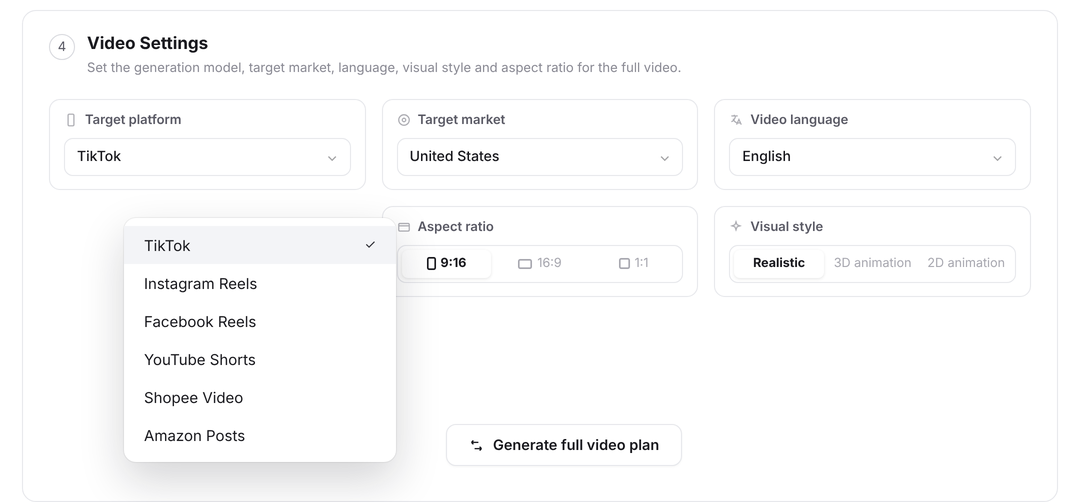
Vibbit's multi-platform adaptation is built on "master template plus platform rules." The team only has to produce one master template and then set the adaptation rules for each platform inside it.
In practice, Vibbit supports automatic conversion to these ratios:
9:16 vertical: for TikTok, YouTube Shorts, Kwai, the overseas version of Douyin and other mainstream short drama platforms.
1:1 square: for the Instagram feed, the Facebook feed and similar placements.
16:9 landscape: for YouTube long-form, embedded playback on a website and similar uses.
4:5 vertical: for some Instagram Reels display contexts, e-commerce feeds and similar.
Vibbit's adaptation is not simple cropping or letterboxing but intelligent framing. The system identifies where the human subject sits in the frame and prioritises keeping faces and key action from being cut. If the source video is 9:16 and a 1:1 version is needed, Vibbit calculates the best crop area automatically rather than mechanically cropping from the centre. Where padding is needed, the system adds a blurred background or a solid-colour margin so the frame still looks considered.
Configure these rules once and, at batch render time, the system generates a video file at the right ratio for every platform and names them by "episode_platform_ratio," removing the manual conversion work entirely.
III. Automatic caption adaptation: safe areas, typefaces and language rules
Captions are where multi-platform distribution most often goes wrong. Vibbit's caption adaptation is deeply optimised for short drama going global.
Automatic safe-area avoidance. The team can preset a bottom safe-area pixel value per platform in the template — 180 pixels for TikTok, say, and 120 for YouTube Shorts. At render time, Vibbit shifts the caption box above the safe area automatically so dialogue is never covered by platform UI.
Adaptive typeface and size. Platforms differ in caption reading habits. TikTok audiences are used to large, high-contrast captions, while YouTube viewers may accept slightly smaller ones. Vibbit lets you configure an independent caption style per platform — typeface, size, colour, outline, shadow — applied automatically during batch rendering.
Multilingual caption re-layout. Short drama going global usually means several language versions. When adapting captions, Vibbit adjusts line breaks and layout automatically to the character length and reading direction of the target language. An English caption may run longer than the Chinese, so the system splits it into two lines; an Arabic version switches to right-to-left layout and the caption box position is adjusted accordingly. That keeps captions legible on every platform in every language version.
IV. Batch cover generation: from video frame to platform cover
The cover drives click-through for short drama. Making a cover by hand for every episode on every platform is enormous work and hard to keep stylistically consistent. Vibbit's batch cover generation solves that.
Automatic extraction of high-quality frames. Vibbit analyses each episode's frames and shortlists the ones that are sharp, have a prominent human subject and carry strong emotional expression. The team can pick quickly from the shortlist, or let the system choose automatically by preset rules — prefer a frame with the lead's face front-on at moderate brightness, for example.
Templated cover design. The team can design cover templates in Vibbit with title text, episode-number tags, brand logo and decorative elements. Text areas in the template can bind to data fields such as series name, episode number and platform name, and are substituted automatically during batch generation. A TikTok cover might foreground "Episode 3" and the series name, a YouTube cover a cliffhanger line, an Instagram cover a close-up of the character's emotion.
Automatic multi-size output. Vibbit generates covers at the size each platform requires — 1:1, 16:9, 9:16, 4:5 and so on. Text position adjusts to the size automatically so the title is never covered by platform UI such as the play button or the avatar.
Once batch rendering finishes, video files and cover images correspond one to one, and the team can upload and publish directly without making covers by hand.
V. The actual workflow: a multi-platform distribution package in three steps
Completing multi-platform distribution for an overseas short drama in Vibbit usually goes in three steps.
Step one: configure the platform adaptation rules. Add the target platforms to the project and set video ratio, caption safe area, caption style and cover size for each. Vibbit ships preset templates for the mainstream platforms, so the team can use them as they are or fine-tune them.
Step two: import the drama assets and generate multilingual captions. Load the episodes into the asset library, choose the source language, and the system generates captions automatically. If several languages are needed, select the target languages for automatic translation. Translations can be proofread by a human and sent back in.
Step three: batch render and auto-generate covers. Submit the render task and Vibbit processes every platform, language and ratio in parallel in the cloud, covers included. When rendering finishes, files are named automatically as "episode_platform_language_ratio," and a distribution list is generated showing which platform and purpose each file is for. The team uploads straight down that list.
The core idea of the whole process: configure once, adapt to many platforms; render once, output many specifications; generate once, and have both the video and its cover ready.
VI. Pitfalls to avoid: common problems in multi-platform distribution
Platform rules change often. The UI and safe areas on TikTok, YouTube and others get updated. Check periodically whether Vibbit's platform presets need adjusting and update the safe-area values manually when necessary.
Do not over-rely on automatic cropping. Intelligent framing avoids faces well, but where important information sits at the edge of frame — a caption bar, a prop cue — automatic cropping may remove it by mistake. Preview the key frames of each episode before batch rendering and confirm that the crop areas make sense.
Keep cover text short. Too much text on a cover looks cluttered, especially at thumbnail size on mobile. Keep the series name, the episode number and one line of core suspense on the cover, and leave the rest to the video itself.
Check copyright and compliance. Review standards for short drama content differ by country. Before distributing in bulk, confirm the content meets the law in every target region and each platform's community standards, so a compliance issue does not take the whole batch down.
VII. Multi-platform distribution is systematic adaptation, not repetitive labour
Multi-platform distribution for short drama going global is at heart a content-localisation engineering problem. What it tests is not how many late nights a team can work but whether it has an efficient, accurate, reusable adaptation system. Vibbit's one-click ratio, caption and cover adaptation productises exactly that systematic capability, moving multi-platform distribution from manual adjustment to an automated pipeline.
In the multi-platform competition of short drama going global, the real efficiency advantage is not how strong the content is but how smoothly the distribution system runs. Vibbit's one-click adaptation lets one series cover the most traffic entry points at the lowest marginal cost and with the most consistent quality. Once multi-platform distribution turns from a bottleneck into infrastructure, a team can put its real attention into creating and operating, and let good content reach more overseas viewers.