How to Translate a Short Drama Into English and Dub It
Short drama translation made simple: remove the original subtitles, translate to English and dub every character in their own voice with Vibbit.
The fastest way to handle short drama translation is to do it all in one place. In Vibbit, you remove the original subtitles, translate the dialogue into English and dub each character while keeping their voice. You don't need editing skills or voice actors: upload an episode and get an English version ready to post.
The problem
Say you run a channel for English-speaking or Latin American audiences and want to bring a short drama to YouTube, TikTok or Instagram. The episode has burned-in subtitles in the original language and the voices aren't in English. Most viewers will swipe away in the first few seconds.
Brands using short dramas in their ads, course creators with story-based lessons and indie creators with vertical series all hit the same wall: the content is good, but the language and the subtitles stop it from reaching new viewers.
How it used to be done
The old way was manual. Mask the subtitles in an editor, hire English voice actors to record every line, then put audio and video back together and try to sync the lips by hand.
It was slow and costly. Masking blurs part of the picture. Voice actors charge by the minute and need scheduling. New voices don't sound like the original cast, which breaks the spell. Manual lip sync rarely works on fast-paced dramas, and one change to a subtitle or a voice meant redoing the episode.
How to do it with Vibbit
Three steps: upload, remove the subtitles, translate and dub. It all happens in the browser.
1. Upload the episode
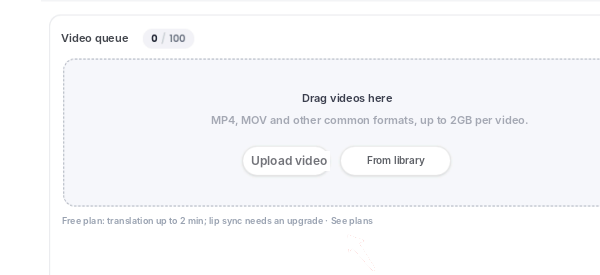
Drag the episode into Vibbit Video Translation. MP4, MOV and other common formats are supported, up to 2GB per video.
2. Remove the original subtitles
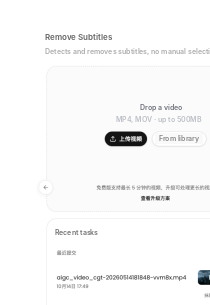
Use Remove Subtitles & Watermarks to clear the burned-in subtitles. Vibbit detects and removes them automatically, with no manual masking.
3. Pick English and keep each character's voice
In Video Translation, choose English as the target language. Vibbit translates the dialogue and dubs it in a natural English voice that keeps each character's original voice, so nobody suddenly sounds like a stranger. You can switch to a different voice in the voice settings. Lip sync is available as an option.
4. Review and export
Go through the translation line by line on the timeline. Fix any line you don't like and re-dub just that one. You can download the SRT file first to check the translation, then export the English version with or without subtitles. I post the version without subtitles on Instagram for a cleaner look, and the subtitled one on YouTube for people watching on mute.
A real example
I tested a 90-second short drama: removed the original subtitles, translated it into English and kept the lead actress's voice. It took about 15 minutes from upload to finished video. I downloaded the SRT first so a teammate could proofread it, then exported both versions. Checking the subtitles before generating the final video saved me a round of fixes.
Does removing the subtitles hurt the picture quality?
Not noticeably in my tests. When I compared before and after, the area where the subtitles had been was hard to spot. Results depend on the footage, so check busy backgrounds and fast motion before you publish.
Can I keep the original characters' voices?
Yes. Vibbit dubs in English using a voice that matches each original character, and you can change it in the voice settings if you want something different. For short dramas, this matters most: viewers follow the characters, and a voice that doesn't fit ruins the role.
How long does it take and what does it cost?
A 1 to 2-minute episode took me around 15 minutes. Costs are in credits and depend on length and options such as lip sync. The estimate is shown before you submit, and current plans are on vibbit.ai/pricing.
Which languages are supported?
Vibbit supports 20+ target languages with natural, localized voices, including English, Spanish and Portuguese, which covers North America and Latin America. Switching from English to Spanish is one setting.
Can I get subtitles first and dub later?
Yes. Download the SRT file, check the translation, then decide whether to dub and render the video.
FAQ
Will the English dub match the lip movement?
You can turn on lip sync to match the dub to the mouth movement on screen.
My episode is long. What should I do?
Try a short section first. When you're happy with it, translate the full episode. Length limits depend on your plan.
Can I fix a wrong translation?
Yes. Find the line on the timeline, edit it and re-dub only that sentence.
Can I upload the result straight to YouTube or TikTok?
Yes. You export a regular video file with or without subtitles.
What about rights?
Only translate dramas you own or have a license to distribute.
Try it
Upload an episode of your short drama to Vibbit and get an English-dubbed version: vibbit.ai