How to Adapt One Product Video for Multiple Platforms
Plan product video framing, pacing, captions, and language versions before editing so each channel receives a usable cut.
A product video can start from the same footage without becoming the same upload everywhere. A vertical opening that works in a short-form feed may lose its product label when cropped for a wide player. A detailed demonstration may need a shorter opening for Reels or Shorts. The practical question is which decisions can be made once, and which need a channel-specific version.
This guide treats distribution as a production requirement. It focuses on the video itself: framing, duration, captions, language, and version control. For the broader publishing plan, see our video distribution strategy guide.
Define the deliverables before editing
List the actual placements, not just platform names. YouTube Shorts and a standard YouTube video, for example, do not call for the same composition. Record the required aspect ratio, intended duration, opening message, caption area, language, and call to action for each placement. Check the current specifications in each publishing tool before export; they can change.
| Placement | Starting format | Editing check |
|---|---|---|
| Short-form feed | Usually vertical | Can viewers understand the product and offer in the opening seconds? |
| Square feed or marketplace slot | Square where supported | Are the product and price legible after reframing? |
| Wide video or product page | Landscape where supported | Does the pacing leave enough room for a fuller demonstration? |
Keep the product, essential text, and speaker in a safe central area while shooting. Capture extra space around the subject so later crops have room to move. A resize alone cannot recover a label or a hand movement that was outside the original frame.
Make a content master, then adapt each cut
Start with one verified source of product facts: name, specifications, price, offer period, and approved claims. Build a content master with the key shots, narration, captions, and call to action. From it, make placement-specific versions:
- Reframe the picture. Review every shot, especially close-ups and text overlays. Adjust crop and layout where the subject moves.
- Change the opening and pace. A short-form version may need the product benefit immediately; a longer cut can show context first.
- Check captions in context. Keep them readable and clear of buttons or overlays in the destination app. Review silent playback.
- Export and watch each version. Automated resizing saves repetitive work, but a human should still catch awkward crops, clipped captions, and missing context.
If several markets are involved, create a language checklist as well. Translation may change line length and voiceover timing, so a language version needs another visual and factual review, not just translated text.
Where Vibbit fits
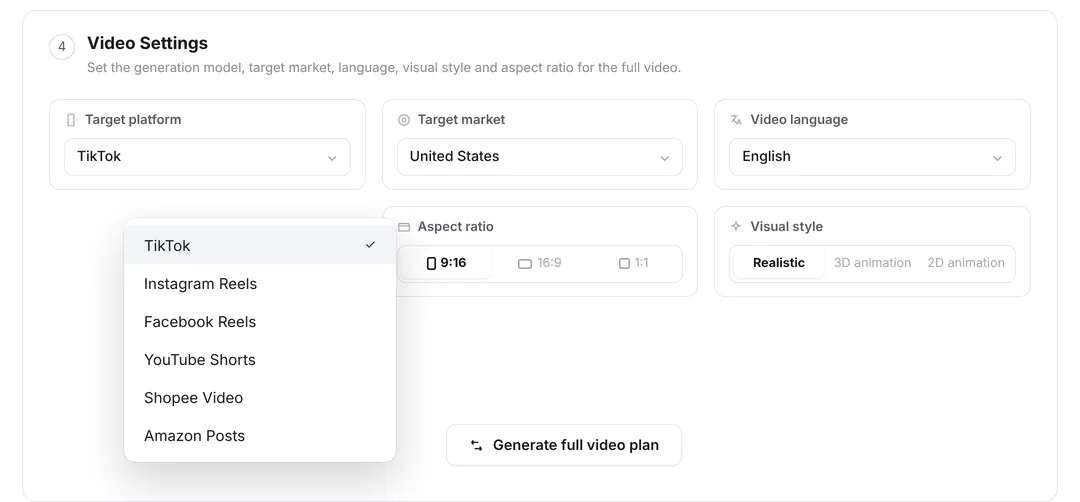
Vibbit's video settings let creators choose a target platform, market, language, and aspect ratio. Its AI video generator and video translator can help with production and localization. The exact set of outputs and available controls depends on the workflow in use; test the intended formats with a sample video before planning a large batch around them.
The most useful automation is in repeatable adjustments. Keep human review for product claims, visual emphasis, captions, and final exports. For a production-wide view of these decisions, read our e-commerce video production pipeline.
Keep versions traceable
Name files with a stable product ID, placement, language, and revision, such as sku123_shorts_en_v02. Store the source project and approved product facts alongside the exports. When a price or offer changes, this makes it possible to identify every affected version rather than searching through folders by eye.
Multi-platform production works best when the team plans the differences up front. One source of truth can serve many channels, but every published cut still needs to fit its own placement and audience.