Central Idea: When choosing batch editing software, the core question is whether it can form a "standardization—automation—closed-loop" content production system
The batch editing software truly suited for e-commerce teams is not the one with the most features, but the one that best solves the two core pain points: "repetitive labor" and "data iteration." It should let you run all products through one template, cover all assets with one import, adapt to all platforms with one generation, and guide the next round of optimization with one cycle of data feedback.
The batch editing software truly suited for e-commerce teams is not the one with the most features, but the one that best solves the two core pain points: "repetitive labor" and "data iteration." It should let you run all products through one template, cover all assets with one import, adapt to all platforms with one generation, and guide the next round of optimization with one cycle of data feedback. These six dimensions are all built around this central idea.
Dimension 1: Template Capability—Can Winning Formulas Be Turned into "Digital Assets"
E-commerce short videos may seem endlessly varied, but content that actually drives volume tends to follow fixed patterns: attract attention in the first three seconds, showcase the product's core selling points in the middle, and drive the purchase at the end. If batch editing software cannot turn these patterns into reusable templates, forcing you to build the structure from scratch every time, then "batch" is empty in name only.
How Vibbit does it: Vibbit allows you to create custom templates and preset all elements such as the intro, transitions, subtitle positions, background music, and ending CTA. Once a template is set, it essentially turns your team's winning formula into a digital asset. Next time you make videos for new products, you just apply the template—no need to design from scratch. You can also save multiple template versions and switch between them for different product categories or promotional scenarios.
When evaluating, ask yourself one question: Can this software turn "one success" into "reusable every time"? If the template function is weak or modifying templates is cumbersome, that's basically a veto.
Dimension 2: Batch Generation Efficiency—Is It "One-Click Generation" or "One-Click Freeze"
The core promise of batch editing software is "batch," but many tools work fine for a single video yet crash, freeze, or force you to wait in a long queue when you reach dozens or hundreds of videos. E-commerce teams can't afford to wait—hot topics and promotional windows are short.
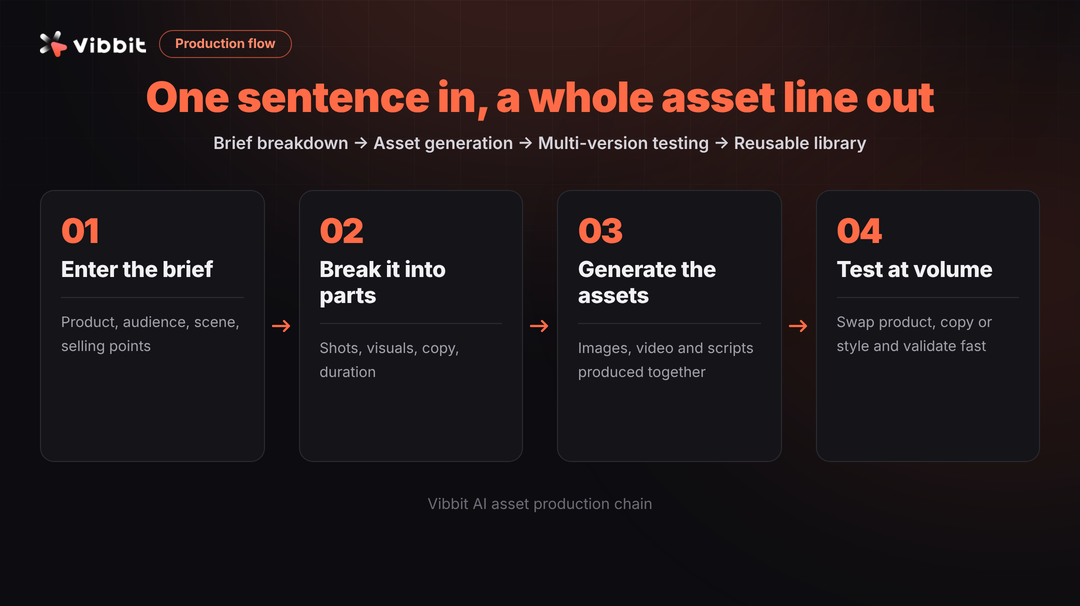
How Vibbit does it: Vibbit's batch generation is truly one-click. After configuring the template and asset pool, click "Generate All," and the system follows the template logic to create independent videos for each product, automatically replacing main images, detail images, copy, prices, and other information. In practice, short videos for 50 products can be completed within 10 minutes from clicking generate to finishing export—most of that time is spent waiting for rendering rather than manual work. It also supports generating multiple aspect ratio versions simultaneously, further doubling efficiency.
When evaluating, don't just look at marketing claims—run actual tests: How long does it take to generate 50 videos simultaneously? Will it fail midway? Are the exported file names standardized? These details determine whether it can truly fit into daily production.
Dimension 3: Multi-Platform Adaptation—Produce Once, Distribute Everywhere
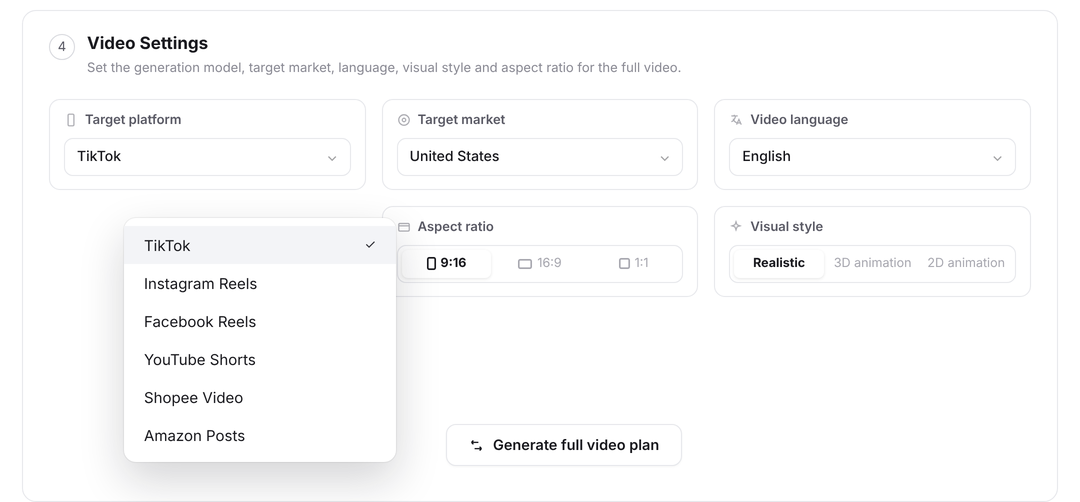
E-commerce teams never publish content to just one platform. Douyin needs vertical video, Taobao main images need square, and Bilibili may need horizontal. If you have to edit separately for each platform, the value of batch editing is cut in half. Good software should achieve "produce once, adapt to multiple platforms."
How Vibbit does it: Vibbit supports outputting 9:16 vertical, 1:1 square, and 16:9 horizontal versions from the same template simultaneously. The system intelligently crops based on the main subject, ensuring the product remains within the safe area and key information is never cut off when switching aspect ratios. This means you only need to prepare the template and assets once to get video versions covering all mainstream channels—no repeated labor required.
Dimension 4: Automated Subtitles and Voiceover—Let Selling Points "Speak" for Themselves
If a product short video lacks subtitles and voiceover, information delivery efficiency drops significantly, especially in scenarios where users browse with sound off. Yet manually adding subtitles and recording audio is the most time-consuming part of batch editing—many teams get stuck right here.
How Vibbit does it: Vibbit supports directly reading each video's voiceover script or selling point phrases from a spreadsheet, automatically generating dynamic subtitles and matching them with AI text-to-speech. Multiple voice options are built in, and it can automatically adjust subtitle timing based on script length to keep visuals, subtitles, and audio essentially synchronized. If you're doing cross-border e-commerce, it also supports multilingual subtitles and voiceovers—the same batch of products can generate both Chinese and English versions in bulk.
When evaluating, focus on: subtitle generation accuracy, voice naturalness, and whether batch import of scripts is supported. If these don't pass muster, the cost of manual correction afterward will be very high.
Dimension 5: Product Data Integration—Can It Directly Read Your SKUs
The biggest asset e-commerce teams have is not creative assets but product data. SKU names, prices, selling points, and main image links usually already exist in an ERP or product library. If batch editing software cannot directly read this data and instead requires you to manually copy and paste entry by entry, efficiency will drop dramatically.
How Vibbit does it: Vibbit supports batch import via CSV spreadsheets and can also connect directly to a product library to pull all SKU information at once. Fields like product name, main image link, and selling point copy in the spreadsheet are automatically recognized and mapped to the corresponding positions in the template. You don't need to manually upload assets or type text for 50 products—just maintain a single spreadsheet.
When evaluating, ask: What data formats does it support? Can it integrate with your existing product management system? Is field mapping flexible? If integration costs are too high, consider the trouble of future maintenance.
Dimension 6: Data Feedback Loop—Can the Software Help You Get Smarter Over Time
The endpoint of batch editing is not exporting videos, but optimizing and reproducing based on data feedback after publishing. If a software can only "produce" but cannot help you analyze "which video performed well and why," then it's just a tool, not a system.
How Vibbit does it: Videos generated by Vibbit can be exported in bulk or directly connected to publishing platforms. After publishing, you can quickly determine which template, which copy, and which voiceover perform better based on views, click-through rates, and conversion rates from each channel. Then return to Vibbit, simply modify the template or the copy fields in the spreadsheet, and batch generate optimized versions again. For example, if the first round of testing reveals that "limited-time offer" copy has a higher click-through rate, in the second round you directly replace the selling point copy in the CSV with limited-time offer wording, and within minutes you have 50 new videos.
When evaluating, note: The software itself may not have built-in data analysis, but it must support a "quick modification—batch reproduction" cycle. If every optimization requires rebuilding templates and re-importing assets from scratch, the value of data feedback cannot be realized.
Summary: Choosing Software Is Choosing a Content Efficiency System
Back to the opening question: How do you choose batch editing software? The answer is not in a feature comparison table, but in your workflow. The software truly suited for e-commerce teams should achieve three things: standardization (using templates to lock in winning formulas), automation (using batch replacement to eliminate manual work), and closed-loop (using data feedback to drive continuous optimization).
Vibbit's performance across these six dimensions corresponds exactly to this standard. It doesn't chase fancy transition effects, but instead focuses on the efficiency links that matter most to e-commerce teams. When choosing software, use these six dimensions as a checklist and test them one by one against real scenarios. That way, you can avoid the trap of "lots of features but unusable in practice" and find the one that truly helps you produce 50 product short videos in 10 minutes.