What Is Vibbit? One AI Agent for the Entire Video Creation Workflow
Video creation is usually thought of as a long chain: write the script, find the footage, edit, record voiceover, make captions, grade the picture, build a cover, export versions, distribute to different platforms.
Video creation is usually thought of as a long chain: write the script, find the footage, edit, record voiceover, make captions, grade the picture, build a cover, export versions, distribute to different platforms. Every stage needs a different tool, and switching between tools consumes a great deal of time on its own — never mind the energy lost to repetitive operations. Vibbit sets out to string every stage of that chain together with a single AI agent. It is not simply video editing software but a whole-workflow automated production system covering asset management, template building, batch generation, smart voiceover, caption adaptation and multi-platform output. The key to understanding Vibbit is not memorising how many features it has but seeing its core logic clearly: let the AI agent take over every execution stage that can be standardised and automated, freeing people from repetitive labour so they only make the decisions that genuinely require creativity.
I. What Vibbit is: not a tool, but a whole-workflow AI agent for video creation
There are plenty of video editing tools on the market, but most of them solve the problem of one stage: some are good at editing, some at captions, some at voiceover. Creators switch back and forth between tools, moving data and converting formats by hand. In that model, having more tools actually makes the process more complex.
What makes Vibbit different is that it was designed from the whole workflow outwards. In Vibbit, asset management, template design, batch rendering, automatic voiceover, caption matching, multi-size export and cover generation are not independent feature modules but a complete production pipeline strung together by one data flow. A task runs from importing material to outputting the finished video without leaving the system, without moving files by hand, without configuring the same parameters twice. That is exactly what defines an AI agent: it does not merely respond to one operation at a time but understands your production goal, schedules multiple steps automatically and delivers end to end.
II. The asset library: turning material from dead files into live assets
The first step in video creation is usually finding material, and finding material is usually the least efficient stage of all. Assets are scattered across drives, cloud storage and chat histories, chaotically named and unclear in version, and every use means another hunt.
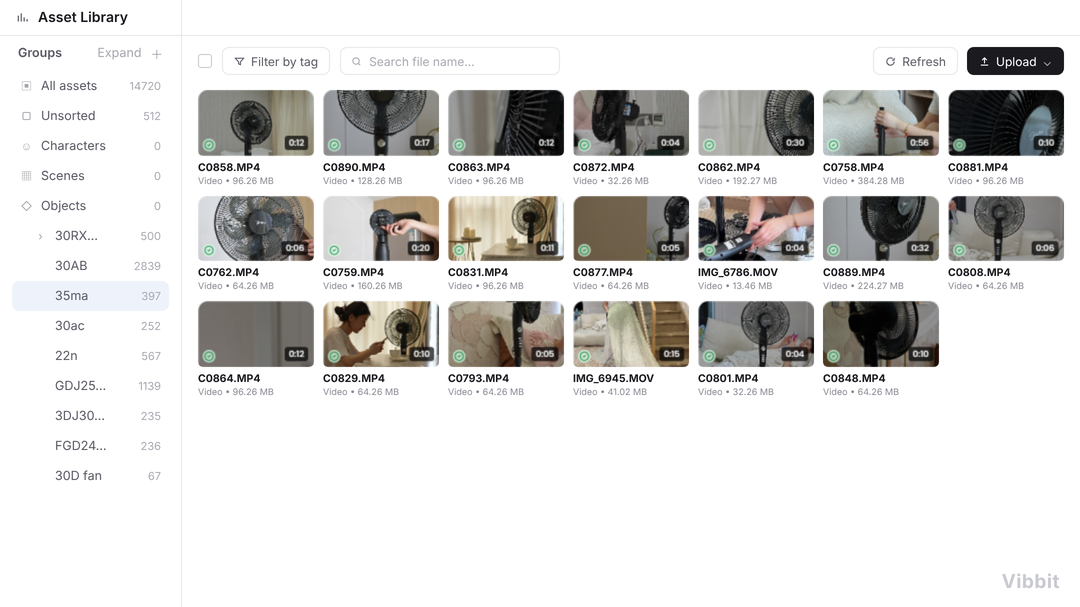
Vibbit's asset library turns asset management into a structured system. A creator can import images, video clips, audio, typefaces and templates into Vibbit and tag them against a custom tag system: by project, by type, by scene, by character, by emotion, by usage status. Once the tags exist, searching becomes filtering by condition — looking for "outdoor establishing shots from last autumn" means entering a few tag conditions and getting results in seconds, with no need to remember file paths.
More importantly, the asset library is not only storage. It is the foundation of every automated operation that follows. During batch generation the system pulls the right material by tag automatically; when a template is updated, videos referencing superseded material are flagged automatically. Material goes from passively stored files to assets actively participating in production, and that is the precondition for whole-workflow automation.
III. The template engine: fixing creative decisions into a reusable production system
Good video creators all have their own style and structural preferences: how to hook the opening, how to handle transitions, what the captions look like, how the ending directs the viewer. In a traditional workflow those preferences have to be set up by hand every time — slow, and easy to let drift.
Vibbit's template engine lets a creator fix that personal experience into reusable templates. One template can hold opener and end card, transition style, caption style, background music, colour presets and the layout of dynamic fields — every fixed element. Once the template is built, making a new video takes only one thing: filling the variable content into a data table — new copy, new material, new price, new title. The system applies the template and does all the rest.
The value of a template is not only saved time but guaranteed consistency. Across one series, whether it is 10 videos or 100, the style is identical. For brands, IP owners and people running account matrices, that consistency is what professionalism looks like, and it is the basis on which an audience forms recognition.
IV. Batch generation and automatic assembly: from one at a time to one batch at a time
However efficiently a single video is made, it cannot keep up with the growth in content demand. Multi-SKU e-commerce video, short drama clips, IP account matrices, daily personal content — what these scenarios share is that the videos are similar in structure but differ in information. If every one starts from scratch, throughput is permanently the bottleneck.
Vibbit's batch generation is built for exactly this kind of structured batch production. The creator organises the differing information for many videos into a data table — one row each, with fields corresponding to the dynamic areas of the template. Once the table is imported, Vibbit processes in parallel in the cloud, and a single render produces dozens or even hundreds of videos. Each is named and output independently, with content matching its row in the table exactly.
This model upgrades video production from workshop to production line. The efficiency gain is not a few tens of percent but a jump of an order of magnitude. A team no longer worries about not getting through the work and can turn its attention to what content would be better.
V. Smart voiceover, captions and multilingual adaptation: automating the details of post-production
Voiceover and captions are the textbook high-repetition, low-creativity stages of video creation. Timing by hand and proofreading line by line can take tens of minutes or more for a video that runs a few minutes. If several languages are needed, the work multiplies.
Vibbit automates both completely. The system generates the timeline from speech recognition and aligns caption text precisely to the voice. For voiceover, Vibbit offers a multi-character timbre library and emotion-tag control, generating dialogue for different characters in bulk and regenerating quickly after a change. Multilingual versions work the same way: automatic translation, automatic re-matching of the timeline, automatic adjustment of caption layout and reading pace, so localising content for overseas markets stops being a vast undertaking.
None of this is simply machines replacing people. It frees people from repetitive operations so creators have time to work on the details that actually affect quality: whether the copy moves anyone, whether the pacing holds attention, whether the emotion lands.
VI. Multi-platform output and cover generation: covering every distribution channel in one go
Once the video is made, distribution is just as tedious. Platforms differ in their requirements for ratio, duration, caption safe area and cover size, and adapting by hand means exporting the same video over and over.
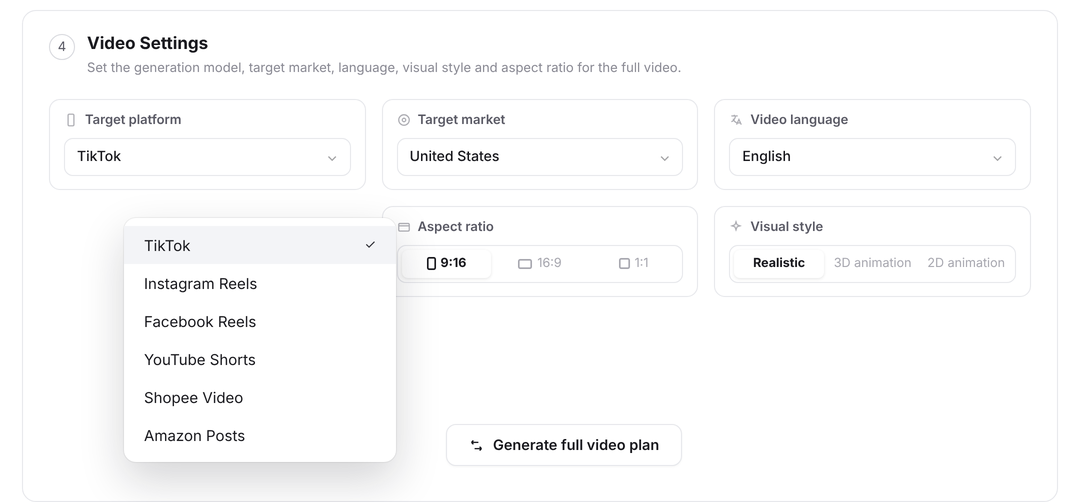
Vibbit's multi-platform output makes it possible for one production to cover every channel. The creator presets adaptation rules per platform in the template — 9:16 vertical, 1:1 square, 16:9 landscape — with caption position adjusted automatically and covers generated and sized for each platform. During batch rendering the system outputs every version at once, named automatically as "content_platform_ratio," and the creator uploads straight down the list.
That means the last mile of the video creation workflow is open too. From material to finished video, from voiceover to captions, from cover to multi-platform versions, Vibbit completes all the execution work with one AI agent.
VII. How Vibbit changes the workflow: from people chasing tools to an AI agent coordinating
A traditional video creation workflow is people chasing tools: open the editing software, then go find material, then find a voiceover tool, then a caption tool, then export by hand. The creator is what strings the process together, and the most exhausted part of it.
Vibbit changes that logic. The creator only does three things: define the template (once), prepare the data (organise the information) and confirm generation (click render). Every other execution stage — pulling material, assembling video, generating voiceover, matching captions, multi-platform output — is completed by the AI agent in the background. The creator moves from operator to decision-maker, from the person making videos to the person telling the system what videos to make.
What matters about that shift is this: the ceiling on video production stops depending on one person's energy and manual speed and starts depending on the system's processing capacity and the creator's planning ability. For teams and individuals who need to produce content continuously, that is a fundamental upgrade in capability.
What Vibbit really is: turning video creation from a craft into a system
What is Vibbit? It is a whole-workflow AI agent for video creation. It integrates asset management, template design, batch generation, smart voiceover, caption adaptation and multi-platform output — stages that were previously scattered across multiple tools — into one automated production line.
The core bottleneck in video creation was never a shortage of ideas. It is that the execution stages swallow too much time and energy. As an AI agent, Vibbit hands every standardisable piece of execution to the system, pulling creators out of repetitive labour and putting their time into decisions that actually carry value — what content to make, what story to tell, how to move the audience. Once video production is upgraded from a craft into a system, one person can have a team's throughput, and a team can produce personalised content at industrial efficiency.