What Is AI Dubbing? How to Give Your Video a Voice in Another Language
What AI dubbing is, how it compares with human voiceover, and how to dub a video into another language with Vibbit, keeping the voice and music.
AI dubbing uses artificial intelligence to replace the speech in a video with a voice in another language. For YouTube creators, TikTok creators, ecommerce sellers and online teachers, it's the quickest way to make the same video for new audiences without hiring voice actors.
With Vibbit, you upload a video, choose the target language, review the translation, and get a dubbed version that keeps the speaker's voice and the background music. Below is how it works and what to check before you publish.
What is AI dubbing, and what is it good for?
AI dubbing does more than add subtitles. It recognizes what's said, translates it and generates new speech in the target language, timed to the video. It's used for explainer videos, avatar videos, short dramas and product videos.
Say you have an English product video and want a Spanish version. With AI dubbing, you don't need to write the Spanish script yourself, find a voice actor and line everything up. The video is translated and dubbed in one flow, and you review the result.
| AI dubbing | Traditional voiceover | |
|---|---|---|
| How the audio is made | Generated from the translated script | Recorded by a voice actor |
| Changes | Edit a line and re-dub it | Usually re-record |
| Voice | Can keep the original speaker's voice | A different person's voice |
| Best for | Multilingual videos, explainers, product videos, talking videos | Performances that need a specific actor or direction |
AI dubbing doesn't mean every result is ready to publish. Always check pronunciation, tone, pauses and accuracy, especially in product, teaching and technical videos.
How to dub a video with Vibbit
Three steps: upload and choose a language, review the translation, export.
Step 1: Upload the video and pick the target language
Open Video Translation in Vibbit and upload your video. On the video card, choose one or more target languages. Vibbit supports 20+ languages, so one upload can give you Spanish, Portuguese and Japanese versions at once. Turn on lip sync if you want the dub to match mouth movement.
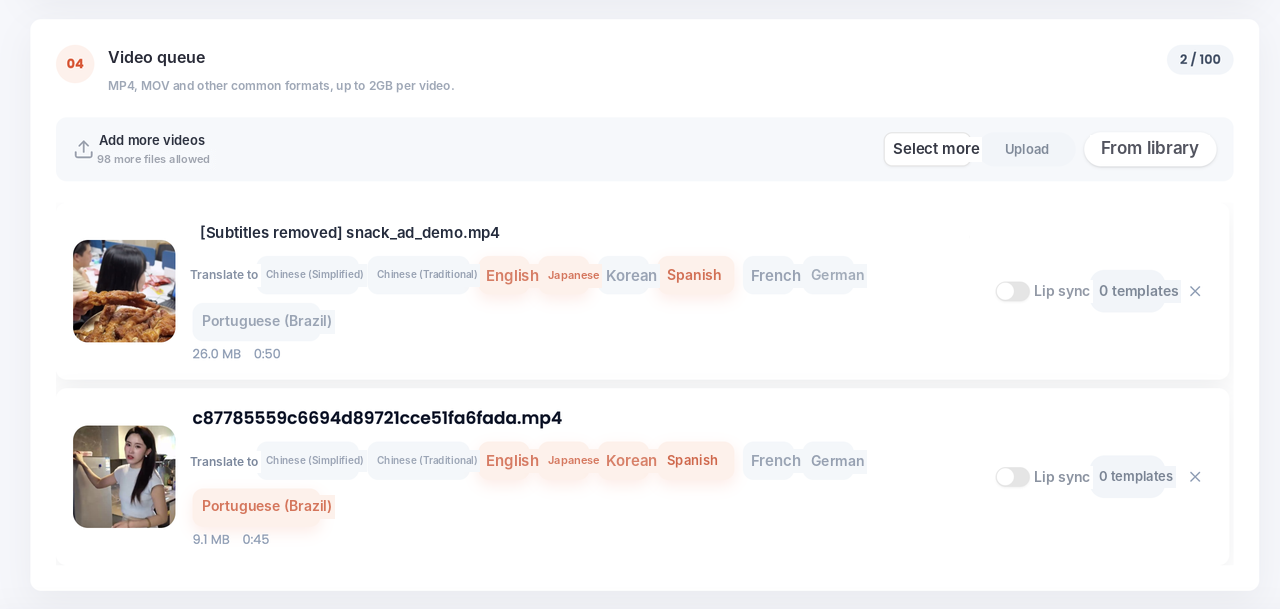
Use a video with clear speech and as little background noise as possible. And only dub videos you have the rights to.
Step 2: Review the translation
Before the final video is made, review the translation line by line: original on one side, translated text on the other, with speakers and timestamps.
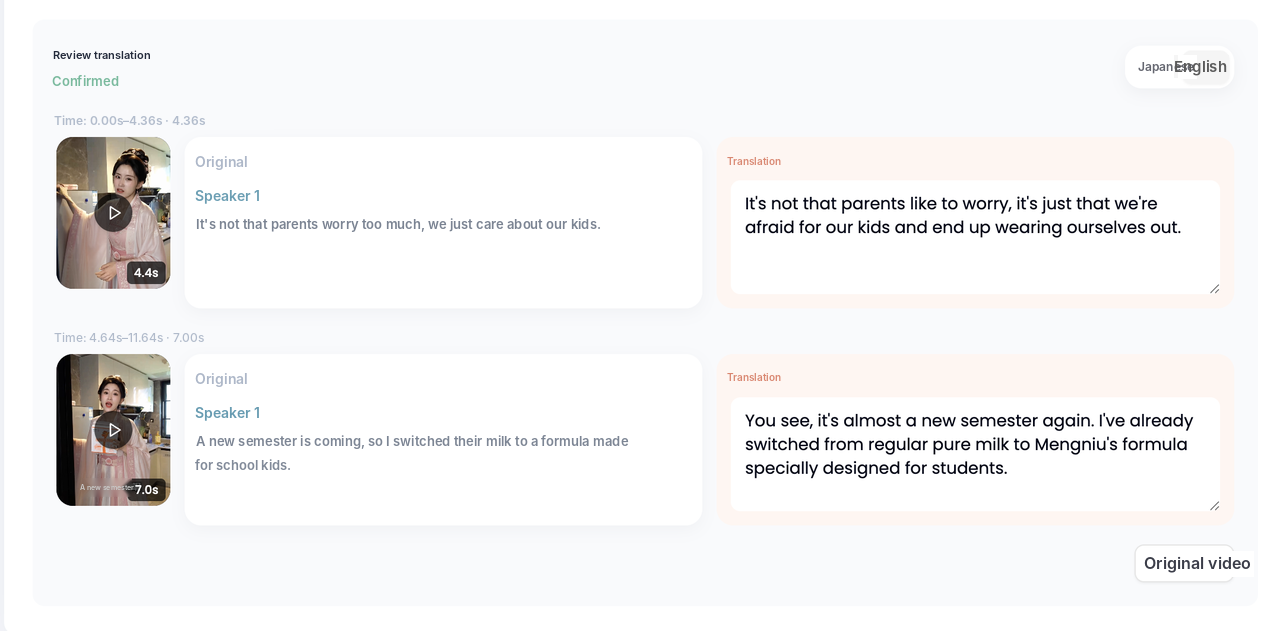
Check:
- Product names, brand names, numbers, currency and terms are right.
- Lines are short and natural enough to say out loud.
- Each speaker has a fitting voice. Vibbit labels speakers so you can give each one a different voice.
Vibbit separates the voice from the background, so the dub replaces only the speech. Music and ambient sound stay.
Step 3: Export and check
Download the dubbed video with or without subtitles, plus an SRT file if you need one. Watch it all the way through once.
For a YouTube tutorial, check that terms are clear and the pace is easy to follow. For a TikTok or Instagram product video, make sure the opening is direct and the selling points survived translation. For Shopify or Amazon product videos, double-check specs, features and prices.
If a line sounds unnatural, fix the translation for that line and re-dub only that sentence. You don't have to redo the whole video.
Tips for better AI dubbing
- Start with clean audio. Clear speech means better recognition and a better dub.
- Review the translation before you dub. Fixing text is faster than fixing audio.
- Keep sentences short. Long sentences and rare abbreviations can sound stiff.
- Keep the background. If viewers need to hear the explanation, make sure music doesn't drown it out.
- Check voice rights. Only dub voices you have permission to use, especially in commercial content.
Only need a voiceover, not a full dub?
If you just need a voice track, for example narration for a product video or an avatar video, use Vibbit's audio tools. Type the script, describe the voice or upload a reference voice, adjust speed, volume and pitch, and generate. Prepare the script in the target language first.
FAQ
What's the difference between AI dubbing and AI translation?
AI translation converts text or speech from one language to another. AI dubbing also generates the new spoken audio and puts it into the video. In Vibbit Video Translation, both happen in one flow.
What do I need to dub a video with Vibbit?
A video with clear speech and the target language. You can review and edit the translation before generating the dub.
Can I post the dubbed video straight to YouTube or TikTok?
Yes, after you've checked the audio, the translation and the rights to the content and voice.
Why does the AI voice sound unnatural sometimes?
Usually because the sentence is too long, the phrasing is stiff, or a term is unusual. Simplify the line and re-dub it.
Start dubbing with Vibbit
Whether it's an explainer, a product video, an avatar video or a lesson, AI dubbing helps the same video reach people in other languages. Upload a video to Vibbit and try it: vibbit.ai