How TikTok Shop sellers batch-make video ads
Put one product in the library, batch-remix 10 TikTok Shop video ads from proven ad structures, then let the data pick the winners.
The fastest way for a TikTok Shop seller to produce video ads in volume is to put the product into Vibbit’s product library, batch-remix it against proven ad structures to get roughly ten TikTok Shop video ads in one run, and then use play and engagement data to pick the few worth putting budget behind. Below is exactly what I did in Vibbit and what I found.
Why do TikTok Shop sellers need so many video ads?
One video rarely converts reliably. Testing several angles at once is how you find the one that’s worth scaling.
TikTok’s distribution looks at retention and engagement in the first few seconds. Before you post, you honestly can’t tell which video will take off. Sellers and creators in Europe, the US and Latin America usually list on Shopify or Amazon and drive traffic from TikTok — and if you only post one or two videos, the likely outcome is nobody sees them. My habit is ten videos per product, each on a different selling point, and let the algorithm choose. Then I concentrate budget on the ones that performed.
What made this hard to do by hand?
The hard part was never the editing. It was doing product research, hunting references and assembling each video one at a time — all of it repetitive.
When I started, the process went: scroll TikTok and the Meta Ad Library for strong ads, download the ones I liked, open an editor and change subtitles, swap product images and adjust the opening, one video at a time, writing new copy and a new hook for each. One product took most of a day. Ten videos was a full day, before any rework.
The frustrating part was finishing all that editing, posting, and finding only one or two got views. The rest was wasted.
Here’s the old way next to Vibbit. The difference is almost entirely repetitive labour:
Stage | By hand | In Vibbit |
|---|---|---|
Finding references | Scroll TikTok / Meta Ad Library, download manually | Viral Hunter extension detects and saves them automatically |
Products and assets | Download and re-upload repeatedly | Saved to the product library once, reused directly |
Output volume | Edit one at a time, 10 in a day | ~10 in one run from proven ad structures |
Picking winners | Gut feel | Plays, comments, shares and likes |
How many steps is it in Vibbit?
Vibbit turns “pick a product → batch remix → pick the winners” into one pipeline. I usually have ten finished videos inside half an hour.
Vibbit’s e-commerce creation includes a product library that batch-imports from product links and deduplicates automatically. The Viral Hunter browser extension parses video ads and products from TikTok, Reels, the Meta Ad Library and Amazon in bulk and saves them into the product and asset libraries, already linked. E-commerce remix works from proven ad structures, generating multiple formula variants in one click, with 3-second hooks, multi-angle variant scripts based on those structures, and HTML end cards.
My process is three steps:
- Pick the product in the library and decide the selling points and creative angles.
- Batch-remix against proven ad structures to get about ten finished videos.
- Use plays and engagement to pick the best few.
Step one: pick the product in the library
Get the product into the library first, and every later video can reuse its images and selling points without re-uploading.
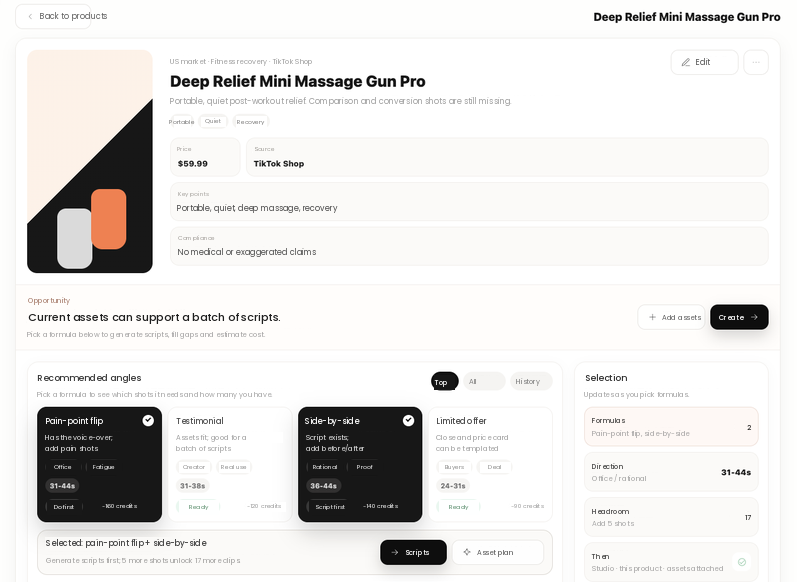
I open a live TikTok Shop product in Vibbit’s library and the page gives me the price, the platform, the core selling points and copy suggestions. The useful column is Recommended creative angles on the right — the system breaks the proven formulas into angles like pain-point reversal, creator testimonial, side-by-side test and limited-time offer, each tagged with a duration and an estimated cost. I usually check two or three, for example pain-point reversal plus side-by-side test. The page also shows the headroom for that product set — I’ve seen a page say there’s room for another 17. Click Generate script or Generate asset plan and remix takes it from there.
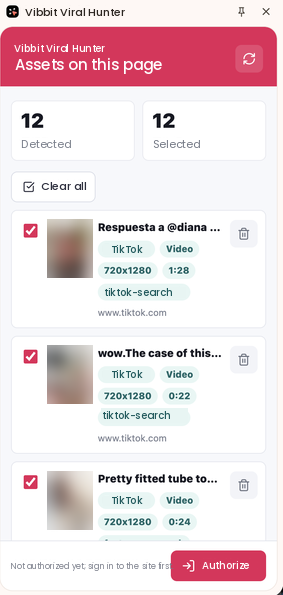
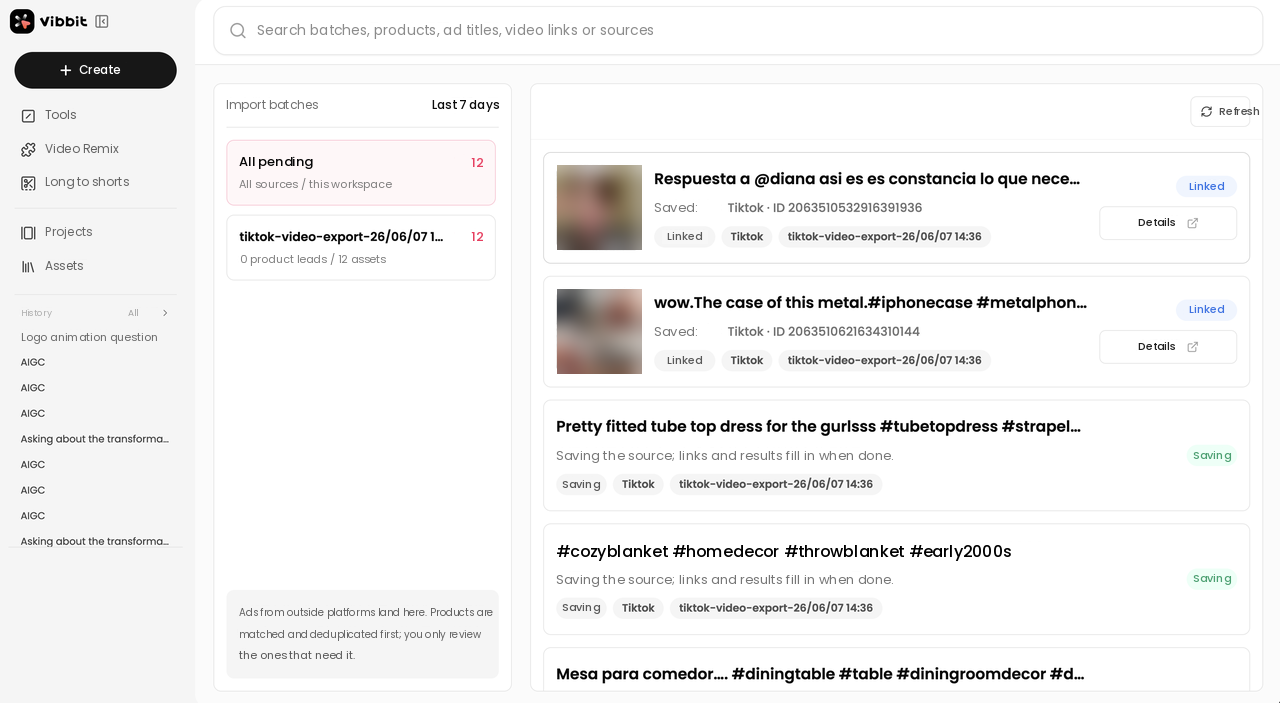
How do products get into the library? If you haven’t built one yet, the Viral Hunter browser extension is the least effort. With it installed, I open a TikTok ad page and the extension detects the ads and products on it, showing “N found.” Click Authorize and save and those products and assets go straight into Vibbit’s product and asset libraries, already linked — no manual download and re-upload. The library also batch-imports from product links and deduplicates, so the same product doesn’t take up two slots.
Step two: batch-remix ten at a time
Once the angles are set, Vibbit produces ten different versions from the proven structures. No manual assembly.
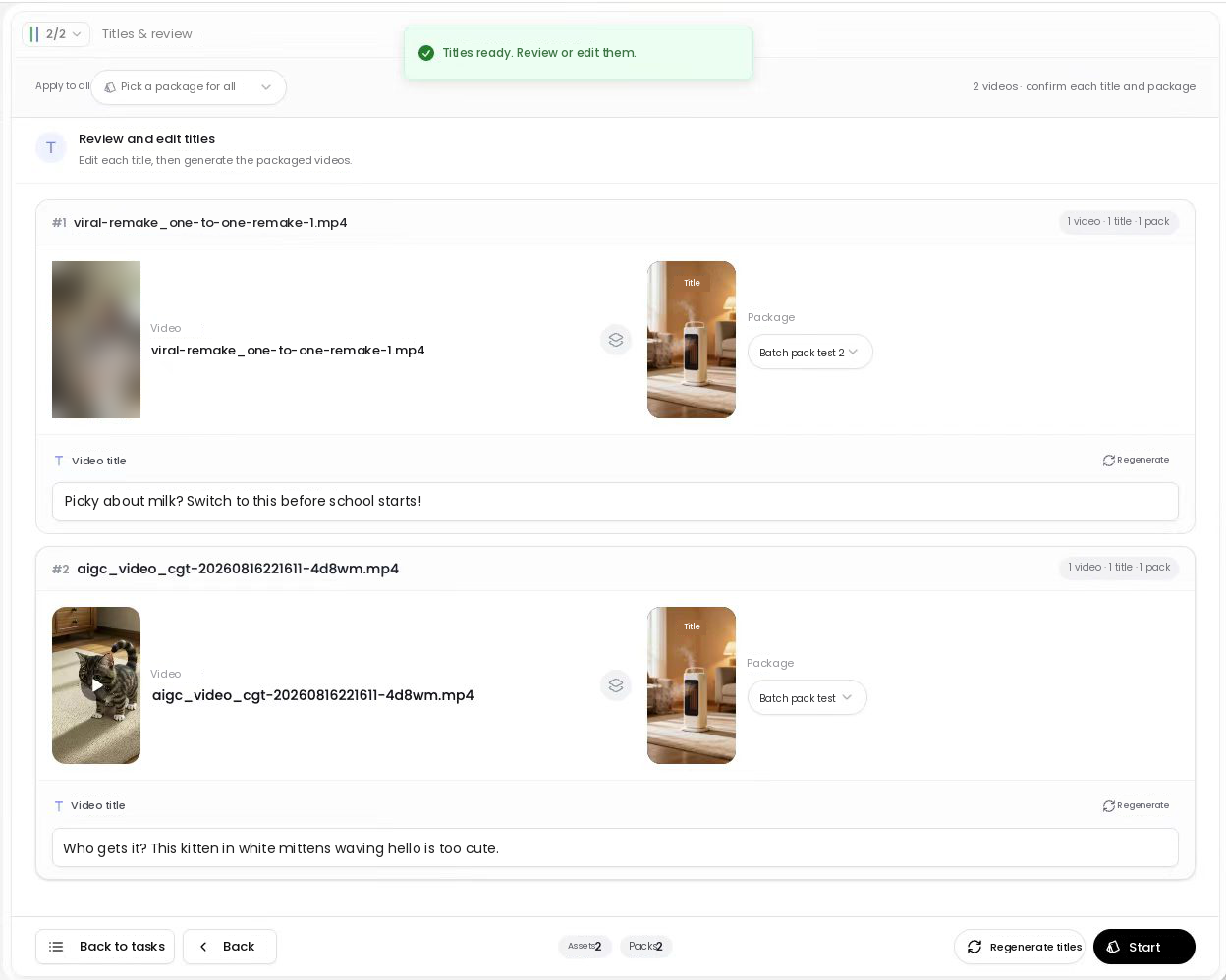
After checking the angles I hit generate, and Vibbit writes multi-angle variant scripts from the proven structures and batch-remixes them into finished videos. I usually take about ten: some lead with a 3-second hook, some go the side-by-side test route, some add an HTML end card to push the order. While they render you land on a batch processing screen that titles and starts several video jobs together, with the counts for assets, packaging and finished videos at the bottom. The video, audio and subtitles download separately if you want to change something in your own editor, though most of the time I use Vibbit’s version as-is.
How do you pick the best few from a batch?
Don’t go on feel. Vibbit’s creative intelligence pulls plays, comments, shares and likes per video, so which one looks like a winner is obvious.
I do two things. First, read the creative intelligence: Vibbit adds the TikTok play count and engagement figures, which tells you which video is more likely to scale, and lets you push it into the asset library for reuse in one click. Second, check Recent output on the product detail page — when I was working on a massage gun, the page showed “pain-point reversal · 3, creator testimonial · 4,” so I could quickly compare which angle was producing more. I take the 2–3 with the best numbers, concentrate budget there, and keep the rest for A/B testing.
What it actually looked like end to end
Same product, ten videos in half an hour, three kept for real budget based on the data.
I’ll use a real listed TikTok Shop product as the example: Deep Relief Mini Massage Gun Pro, $59.99, core selling points being massage, relief, deep relaxation and workout recovery. I opened it in the library and checked two angles — pain-point reversal (31–44s) and side-by-side test (30–44s). The page flagged the hook-opening sequence as “15 satisfied, 6 suggested,” so I added a few shots of post-workout soreness. After generating, Vibbit produced ten finished videos, and Recent output on the product page showed three pain-point reversals and four creator testimonials. I compared projected plays and opening retention and kept three — two pain-point reversals and one side-by-side test — for paid distribution, with the rest as backup. Product selection to finished videos took under half an hour.
FAQ
What’s the maximum per batch remix?
Vibbit gives you a headroom figure based on how much material the product has, telling you how many more it can batch-produce for that set. My usual rhythm is about ten at a time; I’ve seen the page cap out at 17. The real number depends on whether you’ve put enough assets into the product library.
Can I make TikTok Shop videos without a reference ad?
Yes. As long as you have the product link, the product images and the selling points, the product library and the recommended creative angles will generate scripts and asset plans. Reference ads improve your hit rate; they aren’t required.
Which numbers should I look at when picking?
Plays, engagement (comments, shares, likes) and opening retention. Vibbit’s creative intelligence tells you which one looks like a winner, and Recent output on the product page lets you compare volume across creative angles.
Can the generated videos be edited afterwards?
Yes. Inside Vibbit you can change subtitles, swap voices and run video translation across American English, British English and other languages. For finer editing, download the video, the audio and the subtitles separately and work in an editor.
What does a batch of ten cost?
Vibbit bills in credits, shows the estimated consumption before you generate and the actual consumption when the job finishes, so you never wonder what was charged. The amount depends on video length and the model you pick.
If you sell on TikTok Shop and want more ad-ready videos in less time, put your first product into Vibbit’s library and try a batch remix.