Multi-Font Text Generation and Control
Infographic / Edu Visual
Two prompts demonstrating Nano Banana Pro's advanced text control capabilities, allowing the generation of a single string using multiple specified Japanese and English font styles, and even assigning
Prompt
Please display the following string using the specified fonts.
Express the background in white and the text in black.
Generate 9 types of fonts in one go.

# String
{argument name="string 1" default="Nano Banana Proでフォントを再現"}

# Desired Fonts
Mincho (Serif)
Gothic (Sans-Serif)
Reisho (Clerical Script)
Kanteiryu (Kabuki Font)
Handwritten
Decorative/Title (Display)
Horror
Cyber/SF (Tech)
Calligraphy (Script)

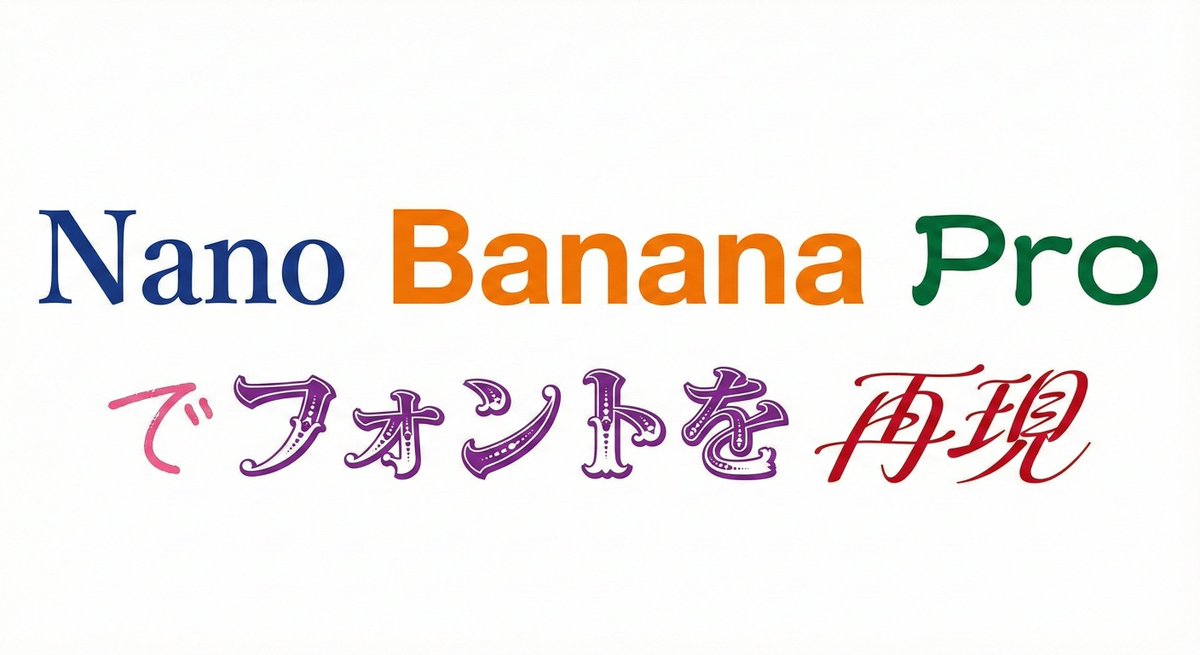
Furthermore, you can specify a particular font for a specific part of the string.

Prompt:
Please display the following string using the specified fonts.
Express the background in white and change the color of the text for each font.

# String
{argument name="string 2" default="Nano Banana Proでフォントを再現"}

# Desired Fonts
Nano: Mincho (Serif)
Banana: Gothic (Sans-Serif)
Pro: Reisho (Clerical Script)
で: Handwritten
フォントを: Decorative/Title (Display)
再現: Calligraphy (Script)