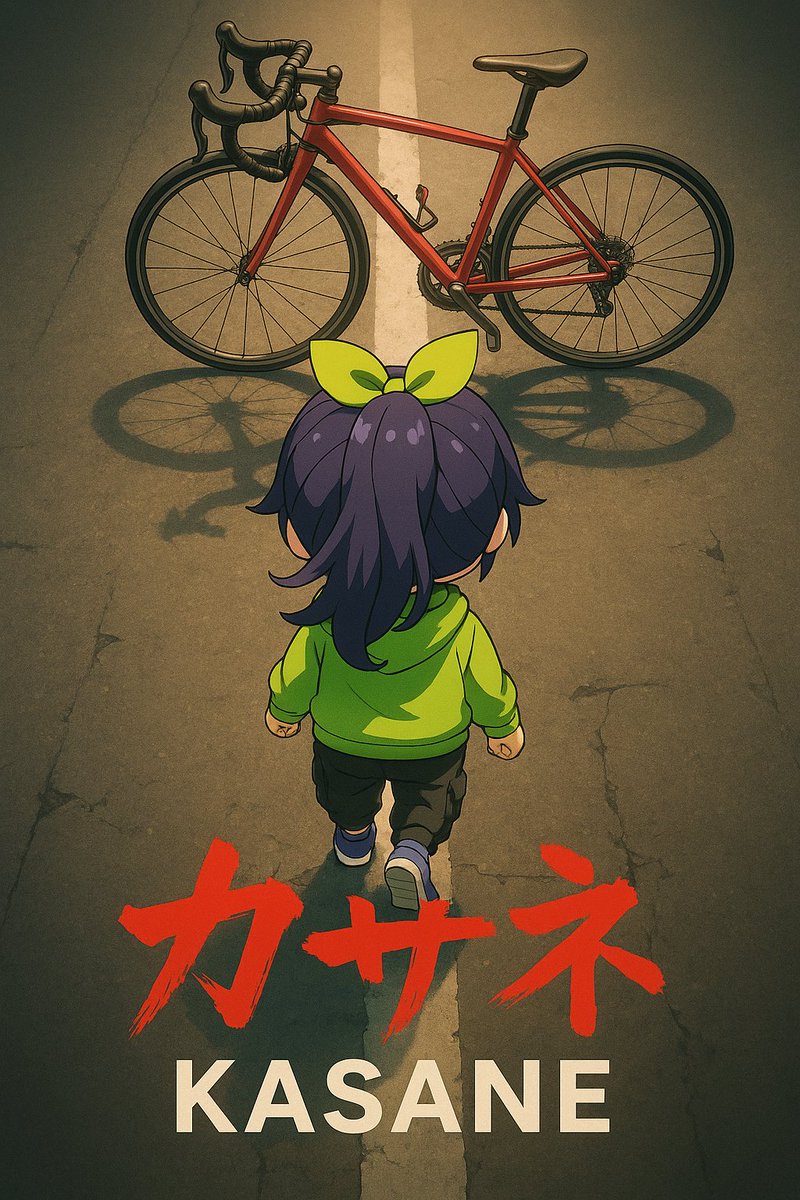
Anime Movie Poster Prompt: Chibi Character and Road Bike
Social Media Post
A highly structured prompt for Nano Banana Pro to generate an anime movie poster illustration featuring a chibi character from behind, stepping towards a red road bike. The prompt specifies the art st
Prompt
image_generation_prompt:
  meta:
    description: "Anime movie poster style illustration of a chibi character from behind, about to ride a road bike"
    reference_usage: "Character appearance refers to the attached image"

  style:
    art_style: "Anime movie poster"
    mood: "Dramatic"

  subject:
    type: "Chibi character"
    pose:
      view: "Back view"
      action: "Stepping forward with the left foot towards the road bike in the background (directly above)"
      target_direction: "Towards the road bike (directly above the image)"

  composition:
    top:
      element: "Red Road bike"
      layout: "Full width of the screen, parallel to the top edge of the image"
    center:
      element: "Back view of the chibi character"
      angle: "Overhead"
    bottom:
      text_layer_base:
        content: "{argument name="base text" default="KASANE"}"
        style: "bold sans-serif font"
        color: "White"
      text_layer_overlay:
        content: "{argument name="overlay text" default="カサネ"}"
        style: "Rough, brush-stroked characters"
        color: "Red"
        position: "Overlapping the KASANE text"

  objects:
    road_bike:
      color: "Red"
      orientation: "Side view / Horizontal"
      facing_direction: "Left"
    road:
      detail: "A straight white line is drawn in the center of the road. The white line is not clearly visible, only faintly and vaguely. A slight, faint crack is visible in a small part of the left side of the road."

  technical_settings:
    shot_size: "Long shot"
    shot_angle: "Overhead shot"
    zoom_emphasis: "Strong emphasis on the chibi character and the bicycle"
    lens_effects: "Vignetting"
    lighting:
      direction: "Illuminated from above"